Turing Machine: An Exploration A mathematical model of computation describing an abstract
machine.
Table of Contents
Abstract
This proof-of-concept explores the possibility of an educational tool
for the theory of Turing Machines (TM). The tool is presented as a web
application that walks the learner through the definition of a TM,
followed by a simple example, and then allows the learner to interact
with the TM by providing input and observing the output.
The tool is based on Turing Machines by Grégory Apou
[1]. It builds on the idea of a Turing Machine simulator, but with a
more interactive approach. The goal is to enhance the tool by adding
additional functionality. The format follows the interactive example
model
Holbert: Reading, Writing and Proving in the Browser by L.
O'Connor and R. Amjad [2].
This literature review explores academic educational tools for
computer science and mathematics, aimed at university students to
supplement learning, specifically for the following topics: theorems,
proofs, graphs, and theoretical computation (finite automata, Turing
machines, and languages).
We will discuss the academic educational tools that are currently
publicly or privately available for the topics listed above. In
addition, we will outline the features of each tool, and discuss the
strengths and weaknesses of each tool. In addition, we will discuss
common missing features. Finally, we will discuss the future work that
could be done to improve these tools that meet the following criteria:
programmed in JavaScript/TypeScript or Java, and open source code
licensed with an MIT license.
Papers
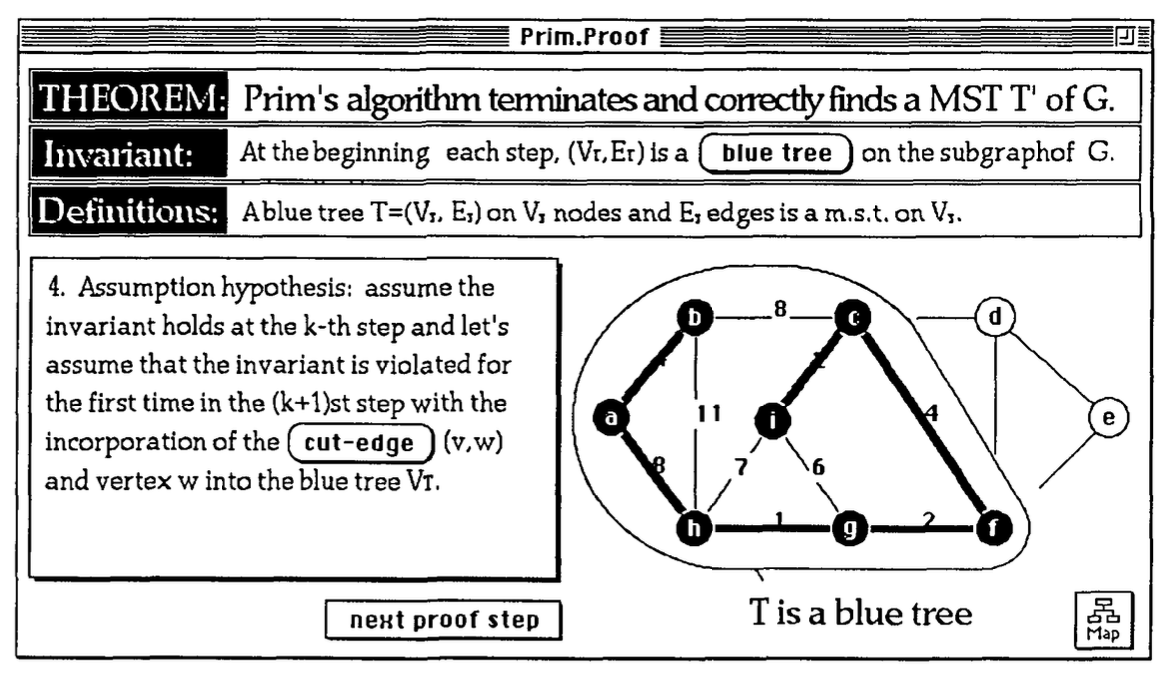
A Visualization System for Correctness Proofs of Graph Algorithms
P.A. Gloor , D.B. Johnson , F. Makedon & P. Metaxas
The paper serves as a foundation for the visualization of algorithms
(and specifically graph algorithms). The paper is accompanied by a
program "Animated Algorithms: A Hypermedia Learning Environment for
Introduction to Algorithms", where they work in HyperCard to create
an explanation of complex algorithms mentioned in "Introduction to
Algorithms" by Thomas H. Cormen, Charles E. Leiserson, and Ronald L.
Rivest. It states that "no previous work on visualizing proofs
appears in the literature" which was published in 1992.
The paper reiterates that "an example is not a proof", but that
providing concrete examples aids in intuition for the base of
proofs. It also distinguish between "visualizing the proof of an
algorithm is different from visualizing the algorithm itself".
However, the paper focuses on illustrating why the algorithm works,
it still serves as a basis for the visualization of algorithms.
Proof-Dialog is introduced as a method of instructing and leading
the learner through the process.
The lack of previous work in this area is partly due to the fact
that proofs often involve hypothetical and abstract objects
created for the purpose of the proof. Such objects are difficult
to visualize. We make use of the fact that there is a
question-answer process that goes on when one reads or is told a
proof. We call this process the proof-dialog. During the
proof-dialog, the reader/listener seeks answers from the text or
the speaker on several questions in order to become persuaded of
the proof's correctness. These questions mainly attempt to find
counter- examples in the arguments presented. It is this proof
process that we try to simulate with visualization.
The following outlines the basic format for such systems. The paper
aims to simulate this process as closely as possible.
The programmer who uses the system has to provide the following
things: 1. The introduction part, in which the definition of the
problem, its significance and other similar information appears.
2. An animation of the algorithm that solves the problem. (As our
prototype system has been implemented in HyperCard, the animation
ideally should be implemented in HyperCard, too. But with enough
technical knowledge it is possible to integrate animation in any
format into our system using digitized video.) 3. The proof-dialog
in terms of a text file having a special format. 4. The animation
of the basis and inductive proof steps. 5. A help file that
contains information about the objects.
The decision to exclusively consider open source tools with MIT
licensing was made because the goal of the proof-of-concept is to
improve on an existing tool. An MIT license allows for the tool to be
used, modified, and distributed freely, as long as the original
license is included
[7]. Thus, open source was also a requirement for the tool to be
considered for this project.
The literature review highlighted that the majority of the papers
reviewed did not include source code and/or a publicly available demo.
In addition, many of the tools that were available publicly available
were not open source. A few tools that did provide source code did not
include a license and falls under exclusive copyright. The absence of
a license means that the tool is not open source
[8], and thus, not considered for this project.
An argument can be made that providing source code and/or a publicly
available demo, ignoring licensing, lets readers interact meaningfully
with the research paper and the general purpose. Readers are able to
examine the code, run the code, and assess the contributions
considering full details of the work
[4]. The Public Library of Science (PLOS)
[9]
states "open code gives context that helps readers understand the
work, supports reproducibility, and improves the efficiency of
subsequent related research."
A Turing Machine Simulator by Robert Sedgewick and Kevin Wayne
[5]
encourages the reader to download the source code to inspect and
modify for their own use. It also provides a demo of the tool with
examples. In the Creative Exercises section of the textbook, the
authors encourages readers to write a program to simulate a Turing
Machine and provides starter code.
Open Source Definition
The Open Source Initiative provides a commonly accepted definition of
what constitutes Open Source
[3].
A project is considered Open Source
[6] if it
satisfies the following:
free redistribution,
source code availability,
derivatives allowed,
no limitations of who may use it or for what,
no additional license in place, and
license must not depend on distribution format, technology, presence
of other works.
Licensing Table
Table 1.0: Licensing and Open Source Status of Educational Tools.
A variety of licensing and open source statuses were found when
reviewing the tools. License include unlicensed, MIT, GPL, BSD,
Creative Commons, etc..
Name
University / Organisation
Licensing
OS
Grammophone
University of Calgary
MIT License
Yes
The Context Free Grammar Checker
University of Calgary
Unlicensed
No
BNFGen
Independent
MIT License
Yes
Tree-sitter
Open Source Community
MIT License
Yes
jEdit
Open Source Community
GPL 2.0
Yes
jsCoq
French Institute for Research in Computer Science and
Automation
AGPL-3+
Yes
Stanford Parser
Stanford University
GPL and Stanford CoreNLP
No
Normalization Tool
Griffith University
Unlicensed
No
Das Problem des Handlungsreisenden
Technische Universität München
Unlicensed
No
Der Dikstra-Algorithmus
Technische Universität München
Unlicensed
No
Visualizations of Graph Algorithms
Technische Universität München
Unlicensed
No
Automaton Simulator
Lawrence Livermore National Laboratory
MIT License
Yes
JFLAP
Duke University
Creative Commons Attribution-NonCommercial-Share A Like 2.5
License
Yes
Lean
Microsoft Research
Apache-2.0 License
Yes
Holbert
University of Edinburgh
BSD-3 Clause License
Yes
Turing Machine
University of Strasbourg
MIT License
No
LL(1) Parser Generator
University of Strasbourg
Unlicensed
No
LL(1) Parser Visualization
Princeton University
Unlicensed
No
Data Structure Visualizations
University of San Francisco
FreeBSD
Yes
Breadth-First Search
University of San Francisco
FreeBSD
Yes
Animated Algorithms
Massachusetts Institute of Technology
Unlicensed
No
Table 1.0 shows that almost half of the educational tools are
unlicensed which whether intended or not makes them not open source
(even if the source code is provided) and thus illegible for this
project. The preferred license is the MIT license as it is the most
permissive.
Programming Language
A variety of programming languages were used to create the tools
reviewed including; Haskell, HyperCard, Java, JavaScript, OCaml, and
Rust. The majority of the tools were written in Java and JavaScript.
Although the tool wasn't chosen solely on the programming language
used, it did contribute to the decision. The two programming languages
that were considered were Java and JavaScript. The other programming
languages were not considered because of the lack of familiarity with
the language.
Plain JavaScript is the simplest and most maintainable option for the
proof-of-concept. JavaScript is sufficient for the proof-of-concept
and JavaScript libraries and frameworks are often updating and
introducing breaking changes and depreciating features. Thus, the
proof-of-concept is written in plain JavaScript. It is also easier to
encourage iteration and contributions from the community. The barrier
to entry remains low.
Introduction
Professors often use slides with multiple slides to convey Turing
Machines to students. However, these are limited to a single example,
or at most 2-3 examples.
We had determined that the following are the requirements that are
important when creating a tool. University, non-commercial, open
source, demo publicly available, written in Java or JavaScript, and
has a permissive license (e.g., MIT).
What are we improving? We are improving the documentation, and
realistically the user experience of the application. We are not
focusing on the aesthetics of the tool, but the process of using the
tool. Thus, in some cases the tool might have aesthetic improvements,
but it does not impact the user experience.
What is out there? In some cases when reviewing tools, the author
created a short introduction outlining the tool and the purpose. In
rare cases the author explain why they created the tool and where it
was used. It often contained information about why the tool was made
(e.g., research, degree fulfillment). A large portion of authors
encourage users to explore the tool and to contact them with examples
of them using the tool. An initial question was about the funding
provided for creating the tool, but the answers were sparse, and we
can conclude that if the project was create as part of a research lab
at a university it was funded by academia (e.g., professor's salary,
research grants, etc.).
Once you introduce a computer, the materials section in a typical
scientific paper doesn’t come close to providing the information
that you need to verify the results.
Reproducibility of scientific research is our ultimate goal, and the
code and data requirement is a first step in that direction.
The majority of the projects are built on HTML, CSS, and JavaScript.
Therefore, the project should also use HTML, CSS, and JavaScript.
Using a framework could be beneficial, but it is better for
maintenance to stick with JavaScript (also no TypeScript, node.js,
etc..).
JavaScript never removes old features – new versions are always
backward compatible. - Dr. Axel Rauschmayer, JavaScript’s a Mess –
and That’s a Good Thing
There are numerous academic papers that discuss educational tools for
computer science and mathematics. However, there are no academic
papers that solely discuss tools that are created by academics. The
main topics are educational tools that are meant to provide instant
feedback, educational tools that are created as a business, or
educational tools that are created by individuals or organisation, but
do not distinguish by profession.
As an example, "Towards a Systematic Review of Automated Feedback
Generation for Programming Exercises"
1 focuses on tools that provide automated
feedback. It discusses the types of feedback that are provided to
learners, but does not evaluate the tools themselves.
A meta study on Algorithm Visualization (AV) effectiveness
2 also focused on the outcome of using
AVs, but not the tools themselves. However, it does discuss three main
questions that are relevant to this literature review.
What kinds of programs can be visualized with a given visualization
system?
What kinds of visualizations can a given visualization system
produce?
What methods can one use to produce and interact with
visualizations?
Selected Tool
Limiting the tools to non-commercial tools. Primarly made by
professors and/or universities.
The tool I chose to update/modify/improve and why. Why was this tool
selected, and why did I choose this approach for
updating/modifying/improving.
Talk about the questions asked for the research.
Why are visuals used to teach algorithms?
Are tools helpful for learners?
What tools are out there and what are they doing?
Is the tool accessible? What is missing? Reviewing for accessibility
was challenging as web standards have evolved and previously best
practice are now outdated and ill advised. As an example, the Turing
Machine uses a mixture of tables and paragraph elements to convey
content. Today this is considered bad practice as it is not
accessible. In addition, most tools are not responsive as this was not
a concern when they were created. Attributes dedicated to
accessibility were not yet available. Another issue with accessibility
is that Java programs (or similar language programs) are not easily
testable for accessibility. The main criteria for accessibility
verification were: keyboard navigation, screen reader, and colour
contrast. As these are the most common accessibility issues (not this
is not an extensive coverage). Thus, for JavaScript programs we also
looked at semantic HTML, which again may not have been available at
the time or the programmer was not aware. In addition, the programs
may include deprecated HTML tags, or CSS rules.
Note: While <input\> elements of type button are still
perfectly valid HTML, the newer <button> element is now the
favored way to create buttons. Given that a <button>'s label
text is inserted between the opening and closing tags, you can
include HTML in the label, even images.
https://developer.mozilla.org/en-US/docs/Web/HTML/Element/input/button
We had a variety of tools. Show all the tools that I found. Group them
in categories of topic.
Talk about the first visualization of an algorithm by that dude 30+
years ago on macintosh. Quote the paper and mention what his theory
was about walking the learner through the algorithm and the tool.
Talk about how with Holbert and the person from 30+ years approached
the topic and the learning journey.
Although this is used as a warning, it highlights the purpose and
intentions of the tool. The tool is not meant to be used by
professionals for professional topics, but as an additional resource.
https://github.com/liamoc/holbert
He mentions the following in the README.md file.
This Holbert instance explains more about the rationale behind its
design and my intended goals with it.
Holbert is intended as a tool for education, and not as an
industrial-strength proof assistant where theorems must be trusted.
Background
The Turing Machine (TM) was first proposed by Alan Turing in 1936. The
TM manipulates symbols on a strip of tape according to a table of
rules. Despite the model's simplicity, given any computer algorithm, a
TM capable of simulating that algorithm's logic can be constructed.
We note that the TM has unlimited and unrestrictive memory where the
tape head can read and write symbols, and move around on the tape.
Turing Machines are often tricky for students to visualize and can
result in confusion regarding transition functions. [RIP: provide
source from a paper or two.]
Turing Machines are easy to visualize interactively with steps,
tables, and diagrams [CITE]. Thus, it is a perfect candidate for an
interactive web application.
Definition
A Turing machine can be formally defined as a 7-tuple:
To better understand the Turing Machine, let's consider a few more
examples;
A Turing Machine that accepts an equal amount of a's and b's.
Accepted String: aabb
Rejected String: aab
A Turing Machine that accepts a string of a's followed by the same
amount of b's.
Accepted String: ab
Rejected String: aab
3-state Busy Beaver
Accepted String: 1
Rejected String: 0
Remember, we will want to use the definition of a Turing machine to
start the example (i.e., the 7-tuple).
To create intuition, walk through a simple example of each accepted
string. Then walk through an example of a rejected string. Afterwards,
think about the number of states required to fulfill the requirements.
Comparing Tools
It would be important to compare both the original tool and the
improved tool based on the literature review conclusion.
Recreate one of the examples from above in the original tool. And then
compare the learning curve and outcome.
The original tool does not provide any documentation. However, it does
provide minimal example inputs for each input field.
The learning curve might be too cumbersome for the benefit of using a
tool to view the transitions.
The improved tool guides the user through an example, and then
encourages more exploration afterwards. It serves as a documentation
in addition to providing input examples.
Problem: Semantic HTML Structure
Good: Native Keyboard Access
Good: Native Focus
N/A: Text Alternatives
Problem: Element Relationship and Context
Problem: WAI-ARIA = aria-live (off, polite, assertive, rude). The
examples are not announced, and so they are excluded from screen
readers.
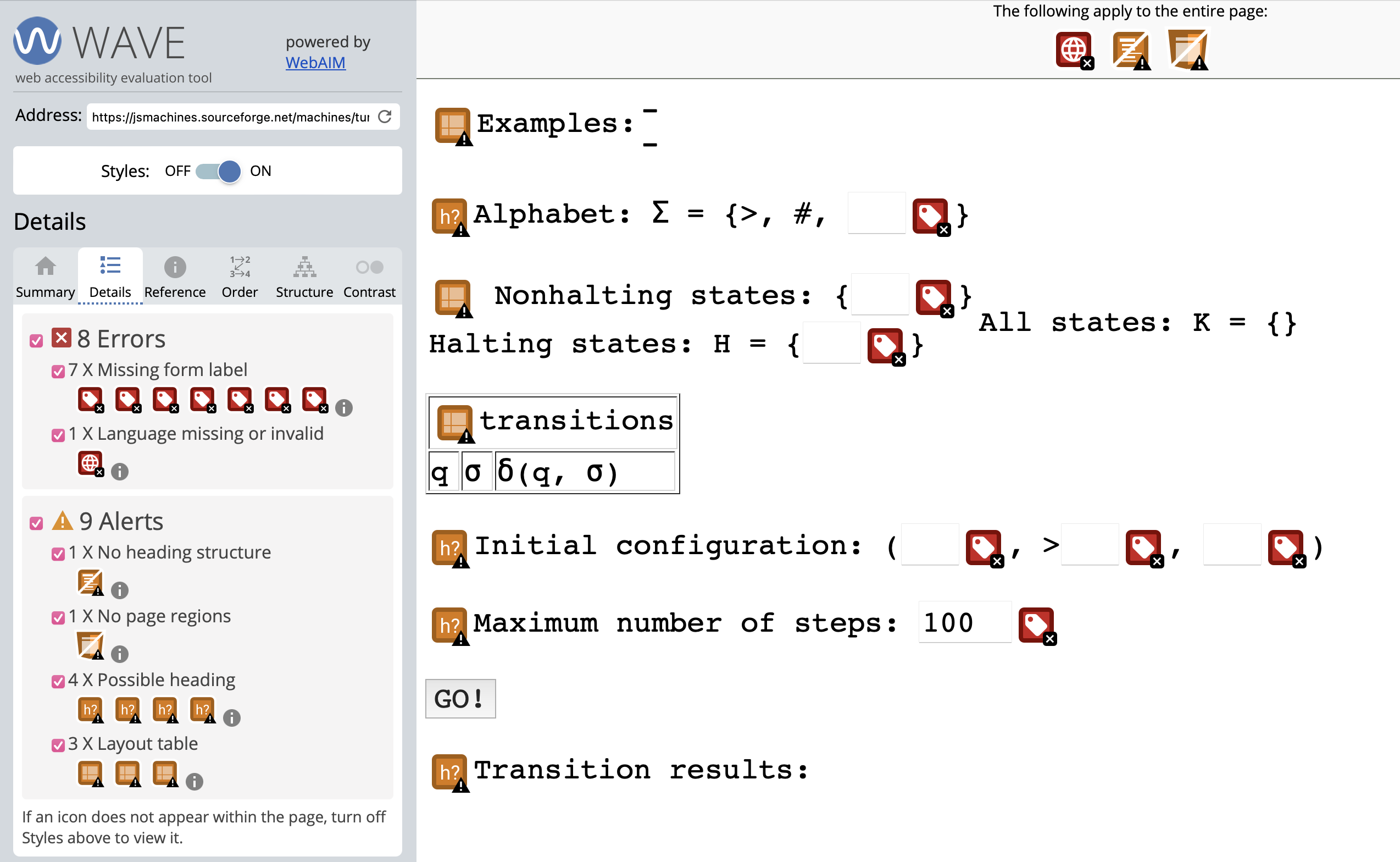
The main areas of problems are unlabelled input fields. And semantic
HTML.
Errors
Missing form label
Missing language
Alerts
No heading structure
No page regions
Possible heading
Layout table
Tool
Turing Machine
$\Sigma = \{>, \# \}$
$Q = \{\}$
$Q_{nh} = \{\}$
$Q_{h} = \{\}$
Conclusion
Summary, examples, discussion. The purpose of the research and study.
Why is this important to me and my academics. Discussion and further
work. How can readers use this paper as a starting point.
Code
The code is available on GitHub under MIT licensing.